> ## Documentation Index
> Fetch the complete documentation index at: https://ngquct-feat-ai-sql-walkthroughs.mintlify.site/llms.txt
> Use this file to discover all available pages before exploring further.
# Settings
> Every settings tab, its controls, and their defaults.
# Settings
Open with `Cmd+,`. Settings are grouped into nine tabs.
Language, startup, tabs, sidebar, query timeout, updates, reset.
Appearance mode, themes, per-theme fonts and colors.
SQL editor, Vim mode, line numbers, query parameters.
Data grid, pagination, result cap, JSON viewer, query history, saved customizations.
Custom shortcuts.
Providers, inline suggestions, context, slash commands.
MCP server, tokens, remote access, activity.
Manage drivers, exporters, and themes.
License, iCloud sync, linked folders.
 ## General
### Language
System (default), English, Tiếng Việt, 简体中文, 繁體中文, Türkçe. Changing the language requires restarting TablePro.
### Startup Behavior
| Option | Description |
| --------------------------------- | ---------------------------------------------------------------- |
| **Reopen Last Session** (default) | Restore the windows, tabs, and view state from your last session |
| **Show Welcome Screen** | Show the welcome screen with saved connections |
Reopened tabs restore their SQL, cursor position, sort, filters, page, and column widths. Connections reconnect lazily on first interaction, so an unreachable database does not block launch. See [Tabs](/features/tabs).
### Tabs
| Setting | Default | Description |
| --------------------------------------- | ------- | --------------------------------------------------------------------------------------------------------------- |
| **Enable preview tabs** | On | Single-click opens a temporary tab that the next click replaces; double-click or interaction makes it permanent |
| **Group all connections in one window** | Off | Tabs from different connections share one window instead of opening separate windows |
### Sidebar
| Setting | Default | Description |
| -------------------------------------- | ------- | ------------------------------------------------------------------------------------------------------------ |
| **Show recent tables** | Off | Adds a Recent section at the top of the sidebar with the last 10 tables opened per connection and database |
| **Show object comments** | On | Shows database object comments next to tables in the sidebar and in grid column headers |
| **Default layout for new connections** | List | List or Tree, for servers that support a database tree. Switch the current connection from the **View** menu |
### Query Execution
**Query timeout** sets the maximum seconds a query runs before cancellation. Default 60; choices from 10 to 600 seconds, plus **No limit**. Applies to new connections, so a change requires a reconnect.
Enforcement happens at the database level where supported:
| Database | Enforcement |
| -------------------------------------------------------------- | ---------------------------------------------------------------------------------------------------- |
| PostgreSQL | `statement_timeout` |
| MySQL | `max_execution_time` |
| MariaDB | `max_statement_time` |
| ClickHouse | `max_execution_time`, plus the HTTP bound below |
| SQLite | `sqlite3_busy_timeout` |
| BigQuery, Cloudflare D1, LibSQL, Etcd, DynamoDB, Elasticsearch | HTTP request timeout set to the query timeout plus a 30-second grace |
| Oracle | Client-side: the connection is closed, and the next query reconnects and restores the current schema |
**No limit** raises the HTTP transport ceiling to 1 hour.
### Command Line
**Install** writes a `tablepro` command to `/usr/local/bin` that opens database URLs in TablePro. If TablePro cannot write there, it shows a command for you to run in Terminal. See [Terminal and DDEV](/external-api/terminal).
### Trusted Links
Lists external links you chose to always allow, with **Forget** per entry and **Forget All**. Only databases on this machine can be trusted; remote links ask for confirmation every time.
### Software Update
| Setting | Default | Description |
| ----------------------------------- | ------- | ------------------------- |
| **Automatically check for updates** | On | Periodic background check |
| **Check for Updates...** | - | Check now |
Powered by [Sparkle](https://sparkle-project.org/). Also available from the **TablePro** menu.
### Privacy
| Setting | Default | Description |
| ------------------------------ | ------- | ------------------------------------------------------- |
| **Share anonymous usage data** | On | Anonymous usage statistics, no personal data or queries |
### Reset
**Reset All Settings to Defaults** resets every settings tab after a confirmation. Saved connections and query history are not affected.
## AI
**Enable AI Features** is the master switch; turning it off hides the other AI sections and disables chat, inline suggestions, and editor actions. **Active Provider** picks the default provider; the chat composer's model picker can override it per turn.
**Add Provider…** offers GitHub Copilot, ChatGPT, Cursor, Claude, OpenAI, OpenRouter, OpenCode Zen, Gemini, xAI, Ollama, and a custom OpenAI-compatible endpoint. Click a provider row to open its detail sheet:
* **Test Connection** verifies the key, sign-in, or endpoint.
* **Model** lists curated models plus models fetched from the provider; pick **Other…** to type a custom model ID.
* **Reasoning** sets the effort level on models that support it, or **Off**.
API keys are stored in the macOS Keychain; removing a provider deletes its key.
### Inline Suggestions
| Setting | Default | Description |
| ------------------------------------------ | ------- | -------------------------------------------------------------------------------------- |
| **Enable inline suggestions while typing** | Off | Ghost-text SQL completions. Requires an active provider. Tab accepts, Escape dismisses |
| **Debounce** | 500 ms | Pause after typing before requesting a suggestion, 100 to 3,000 ms in 50 ms steps |
### Context
| Setting | Default | Description |
| --------------------------- | ------- | ------------------------------------------------- |
| **Include database schema** | On | Auto-attach the active connection's schema |
| **Include current query** | On | Auto-attach the active editor tab's text |
| **Include query results** | Off | Auto-attach the most recent query result snapshot |
| **Max schema tables** | 20 | Cap on tables in the schema attachment, 1 to 100 |
The Privacy section sets the default **Connection policy** (Ask Each Time) applied to new connections. For custom slash commands, chat modes, and per-connection AI rules, see [AI Assistant](/features/ai-assistant).
## Integrations
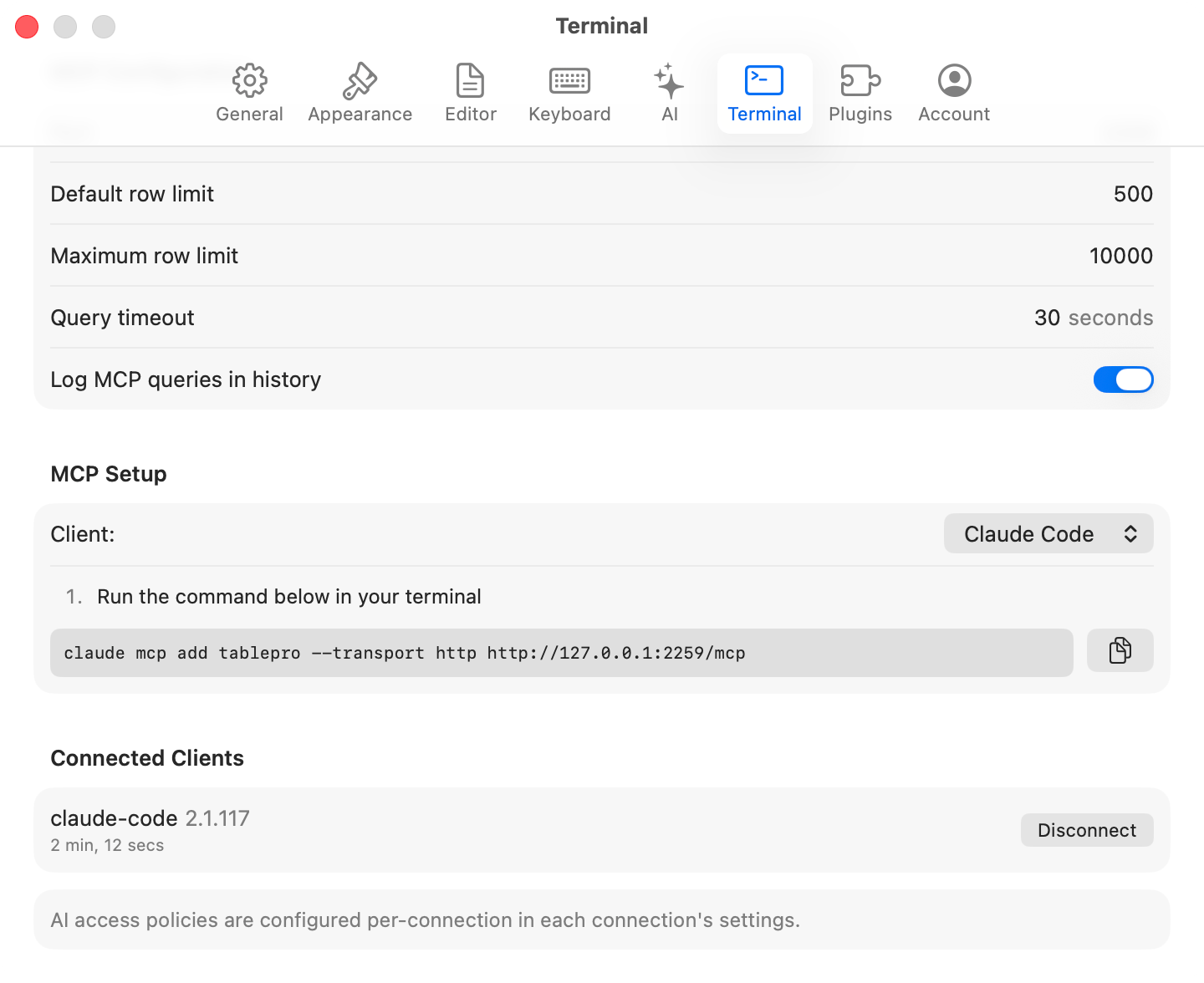
The **Integrations** tab runs the MCP server. **Enable MCP Server** (default off) starts it and shows a live status. See [MCP Server](/features/mcp) for a walkthrough and the [External API](/external-api/index) reference for the tool catalog.
## General
### Language
System (default), English, Tiếng Việt, 简体中文, 繁體中文, Türkçe. Changing the language requires restarting TablePro.
### Startup Behavior
| Option | Description |
| --------------------------------- | ---------------------------------------------------------------- |
| **Reopen Last Session** (default) | Restore the windows, tabs, and view state from your last session |
| **Show Welcome Screen** | Show the welcome screen with saved connections |
Reopened tabs restore their SQL, cursor position, sort, filters, page, and column widths. Connections reconnect lazily on first interaction, so an unreachable database does not block launch. See [Tabs](/features/tabs).
### Tabs
| Setting | Default | Description |
| --------------------------------------- | ------- | --------------------------------------------------------------------------------------------------------------- |
| **Enable preview tabs** | On | Single-click opens a temporary tab that the next click replaces; double-click or interaction makes it permanent |
| **Group all connections in one window** | Off | Tabs from different connections share one window instead of opening separate windows |
### Sidebar
| Setting | Default | Description |
| -------------------------------------- | ------- | ------------------------------------------------------------------------------------------------------------ |
| **Show recent tables** | Off | Adds a Recent section at the top of the sidebar with the last 10 tables opened per connection and database |
| **Show object comments** | On | Shows database object comments next to tables in the sidebar and in grid column headers |
| **Default layout for new connections** | List | List or Tree, for servers that support a database tree. Switch the current connection from the **View** menu |
### Query Execution
**Query timeout** sets the maximum seconds a query runs before cancellation. Default 60; choices from 10 to 600 seconds, plus **No limit**. Applies to new connections, so a change requires a reconnect.
Enforcement happens at the database level where supported:
| Database | Enforcement |
| -------------------------------------------------------------- | ---------------------------------------------------------------------------------------------------- |
| PostgreSQL | `statement_timeout` |
| MySQL | `max_execution_time` |
| MariaDB | `max_statement_time` |
| ClickHouse | `max_execution_time`, plus the HTTP bound below |
| SQLite | `sqlite3_busy_timeout` |
| BigQuery, Cloudflare D1, LibSQL, Etcd, DynamoDB, Elasticsearch | HTTP request timeout set to the query timeout plus a 30-second grace |
| Oracle | Client-side: the connection is closed, and the next query reconnects and restores the current schema |
**No limit** raises the HTTP transport ceiling to 1 hour.
### Command Line
**Install** writes a `tablepro` command to `/usr/local/bin` that opens database URLs in TablePro. If TablePro cannot write there, it shows a command for you to run in Terminal. See [Terminal and DDEV](/external-api/terminal).
### Trusted Links
Lists external links you chose to always allow, with **Forget** per entry and **Forget All**. Only databases on this machine can be trusted; remote links ask for confirmation every time.
### Software Update
| Setting | Default | Description |
| ----------------------------------- | ------- | ------------------------- |
| **Automatically check for updates** | On | Periodic background check |
| **Check for Updates...** | - | Check now |
Powered by [Sparkle](https://sparkle-project.org/). Also available from the **TablePro** menu.
### Privacy
| Setting | Default | Description |
| ------------------------------ | ------- | ------------------------------------------------------- |
| **Share anonymous usage data** | On | Anonymous usage statistics, no personal data or queries |
### Reset
**Reset All Settings to Defaults** resets every settings tab after a confirmation. Saved connections and query history are not affected.
## AI
**Enable AI Features** is the master switch; turning it off hides the other AI sections and disables chat, inline suggestions, and editor actions. **Active Provider** picks the default provider; the chat composer's model picker can override it per turn.
**Add Provider…** offers GitHub Copilot, ChatGPT, Cursor, Claude, OpenAI, OpenRouter, OpenCode Zen, Gemini, xAI, Ollama, and a custom OpenAI-compatible endpoint. Click a provider row to open its detail sheet:
* **Test Connection** verifies the key, sign-in, or endpoint.
* **Model** lists curated models plus models fetched from the provider; pick **Other…** to type a custom model ID.
* **Reasoning** sets the effort level on models that support it, or **Off**.
API keys are stored in the macOS Keychain; removing a provider deletes its key.
### Inline Suggestions
| Setting | Default | Description |
| ------------------------------------------ | ------- | -------------------------------------------------------------------------------------- |
| **Enable inline suggestions while typing** | Off | Ghost-text SQL completions. Requires an active provider. Tab accepts, Escape dismisses |
| **Debounce** | 500 ms | Pause after typing before requesting a suggestion, 100 to 3,000 ms in 50 ms steps |
### Context
| Setting | Default | Description |
| --------------------------- | ------- | ------------------------------------------------- |
| **Include database schema** | On | Auto-attach the active connection's schema |
| **Include current query** | On | Auto-attach the active editor tab's text |
| **Include query results** | Off | Auto-attach the most recent query result snapshot |
| **Max schema tables** | 20 | Cap on tables in the schema attachment, 1 to 100 |
The Privacy section sets the default **Connection policy** (Ask Each Time) applied to new connections. For custom slash commands, chat modes, and per-connection AI rules, see [AI Assistant](/features/ai-assistant).
## Integrations
The **Integrations** tab runs the MCP server. **Enable MCP Server** (default off) starts it and shows a live status. See [MCP Server](/features/mcp) for a walkthrough and the [External API](/external-api/index) reference for the tool catalog.
 ### Server Configuration
| Setting | Default | Description |
| ------------------------------ | ---------- | -------------------------------------------------------------- |
| **Port** | 23508 | TCP port the server listens on |
| **Default row limit** | 500 | Rows returned when a tool call sets no limit |
| **Maximum row limit** | 10,000 | Hard cap on rows per tool call |
| **Query timeout** | 30 seconds | Per-query limit for MCP-issued queries |
| **Log MCP queries in history** | On | Record MCP queries in [query history](/features/query-history) |
### Authentication
**Require authentication** defaults to on. Turning it on with no tokens generates a full-access token named "Default token" and reveals it once; copy it then. Generate, revoke, and delete tokens in the list below the toggle. See [Tokens](/external-api/tokens).
### Network
**Allow remote connections** defaults to off. Enabling it makes the server reachable from other devices and turns on authentication and TLS automatically.
### Clients and activity
**Connect a Client…** shows setup steps and config snippets for Claude Code, Claude Desktop, Cursor, and Zed. **View Activity…** opens the Integrations Activity window with authentication events, tool calls, and connected clients.
## Plugins
Split view: plugin list on the left, details on the right.
* **Installed**: bundled plugins (MySQL, PostgreSQL, SQLite, ClickHouse, and Redis drivers; CSV, JSON, SQL, XLSX, and MQL exporters; SQL, JSON, and CSV importers; CSV Inspector) plus anything you installed. Toggle a plugin on or off in the detail pane. Bundled plugins can be disabled but not uninstalled.
* **Browse**: install from the registry, with search and a category filter (Database Drivers, Export Formats, Import Formats, Themes, Other). Registry drivers: MongoDB, Oracle, DuckDB, SQL Server, Cassandra, Etcd, Cloudflare D1, DynamoDB, BigQuery, Snowflake, Elasticsearch, LibSQL, SurrealDB, and Beancount.
* **Sideload**: click **+** or drag a `.tableplugin` / `.zip` onto the view. TablePro verifies the code signature.
See [Plugins & Themes](/features/plugins) for installing, updating, and managing plugins.
Only install plugins from sources you trust. Code-signature checks do not guarantee plugin behavior.
## Account
Activate, deactivate, or view your license here. TablePro checks the license signature locally, re-validates with the server every 7 days, and allows 30 days offline before validation fails. On a Team plan, paste an invite code in the activation field to join a team instead of entering a key. See [Team plan](/features/team) and [Licensing](/features/licensing).
iCloud sync and linked folders live on the same tab. See [iCloud Sync](/features/icloud-sync).
## Settings Storage
Settings live in `~/Library/Preferences/com.TablePro.plist`. Use **Reset All Settings to Defaults** on the General tab to reset them.
Advanced flags not exposed in the UI:
| Setting | Command |
| ---------------------- | ------------------------------------------------------------------ |
| Custom plugin registry | `defaults write com.TablePro com.TablePro.customRegistryURL ` |
| Clear custom registry | `defaults delete com.TablePro com.TablePro.customRegistryURL` |
### Server Configuration
| Setting | Default | Description |
| ------------------------------ | ---------- | -------------------------------------------------------------- |
| **Port** | 23508 | TCP port the server listens on |
| **Default row limit** | 500 | Rows returned when a tool call sets no limit |
| **Maximum row limit** | 10,000 | Hard cap on rows per tool call |
| **Query timeout** | 30 seconds | Per-query limit for MCP-issued queries |
| **Log MCP queries in history** | On | Record MCP queries in [query history](/features/query-history) |
### Authentication
**Require authentication** defaults to on. Turning it on with no tokens generates a full-access token named "Default token" and reveals it once; copy it then. Generate, revoke, and delete tokens in the list below the toggle. See [Tokens](/external-api/tokens).
### Network
**Allow remote connections** defaults to off. Enabling it makes the server reachable from other devices and turns on authentication and TLS automatically.
### Clients and activity
**Connect a Client…** shows setup steps and config snippets for Claude Code, Claude Desktop, Cursor, and Zed. **View Activity…** opens the Integrations Activity window with authentication events, tool calls, and connected clients.
## Plugins
Split view: plugin list on the left, details on the right.
* **Installed**: bundled plugins (MySQL, PostgreSQL, SQLite, ClickHouse, and Redis drivers; CSV, JSON, SQL, XLSX, and MQL exporters; SQL, JSON, and CSV importers; CSV Inspector) plus anything you installed. Toggle a plugin on or off in the detail pane. Bundled plugins can be disabled but not uninstalled.
* **Browse**: install from the registry, with search and a category filter (Database Drivers, Export Formats, Import Formats, Themes, Other). Registry drivers: MongoDB, Oracle, DuckDB, SQL Server, Cassandra, Etcd, Cloudflare D1, DynamoDB, BigQuery, Snowflake, Elasticsearch, LibSQL, SurrealDB, and Beancount.
* **Sideload**: click **+** or drag a `.tableplugin` / `.zip` onto the view. TablePro verifies the code signature.
See [Plugins & Themes](/features/plugins) for installing, updating, and managing plugins.
Only install plugins from sources you trust. Code-signature checks do not guarantee plugin behavior.
## Account
Activate, deactivate, or view your license here. TablePro checks the license signature locally, re-validates with the server every 7 days, and allows 30 days offline before validation fails. On a Team plan, paste an invite code in the activation field to join a team instead of entering a key. See [Team plan](/features/team) and [Licensing](/features/licensing).
iCloud sync and linked folders live on the same tab. See [iCloud Sync](/features/icloud-sync).
## Settings Storage
Settings live in `~/Library/Preferences/com.TablePro.plist`. Use **Reset All Settings to Defaults** on the General tab to reset them.
Advanced flags not exposed in the UI:
| Setting | Command |
| ---------------------- | ------------------------------------------------------------------ |
| Custom plugin registry | `defaults write com.TablePro com.TablePro.customRegistryURL ` |
| Clear custom registry | `defaults delete com.TablePro com.TablePro.customRegistryURL` |